Travel Policy for Single Sign On SSO Integration
Benefits of integrating Single Sign-On (SSO) with your travel policy platform for user convenience.
Benefits of integrating Single Sign-On (SSO) with your travel policy platform for user convenience.
Travel Policy for Single Sign On SSO Integration
Understanding Single Sign-On SSO in Travel Management
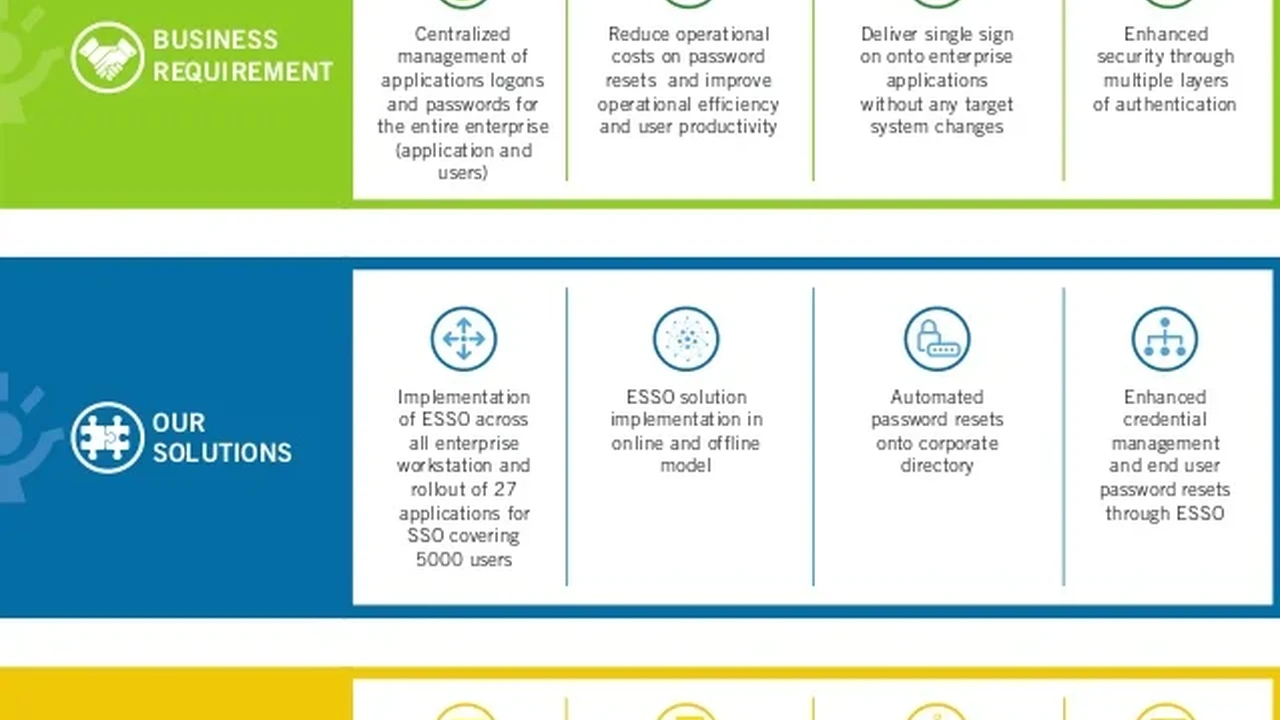
Hey there, let's talk about something super useful for your company's travel policy: Single Sign-On, or SSO. If you're managing business travel, you know how many different platforms and tools your employees might use. There's the travel booking platform, the expense management system, maybe a separate tool for pre-trip approvals, and then your internal HR system. Each of these often requires its own login and password. It's a bit of a headache, right? That's where SSO comes in. Essentially, SSO allows a user to log in once with a single set of credentials to access multiple applications. Think of it like a master key for all your travel-related software. Instead of remembering five different passwords, your employees just need one. This isn't just about convenience; it's a game-changer for security, efficiency, and overall user experience within your travel policy framework.
When we talk about integrating SSO with your travel policy platform, we're looking at streamlining the entire travel process from booking to expense reporting. Imagine an employee logs into their company portal, and from there, they can seamlessly jump into the travel booking tool, check their travel policy compliance, submit expenses, and even access their HR profile, all without re-entering their username and password. This reduces friction, saves time, and significantly improves the adoption rate of your official travel tools. For the travel manager, it means better data, higher compliance, and fewer support requests related to forgotten passwords or login issues. It's a win-win for everyone involved.
Key Benefits of SSO Integration for Travel Policies
Enhanced User Experience and Employee Productivity
Let's be honest, nobody likes remembering a dozen different passwords. It's frustrating, time-consuming, and often leads to employees writing down passwords or using weak ones, which is a security nightmare. With SSO, your employees get a frictionless experience. They log in once, and they're good to go across all integrated travel platforms. This ease of access directly translates to increased productivity. Employees spend less time fumbling with logins and more time focusing on their actual work. When the travel booking process is smooth and intuitive, employees are more likely to use the approved channels and adhere to the travel policy, rather than seeking workarounds.
Consider a scenario where an employee needs to book a flight, then reserve a hotel, and finally submit a pre-trip approval request. Without SSO, that's three separate logins. With SSO, it's one login, and then seamless navigation between these tools. This not only saves minutes per transaction but also reduces mental fatigue. A happier, less frustrated employee is a more productive employee, and that directly impacts your bottom line. Furthermore, a positive user experience with your travel tools reflects well on the company, showing that you value your employees' time and convenience.
Improved Security Posture and Data Protection
This is a big one. While convenience is great, security is paramount, especially when dealing with sensitive travel data and financial information. SSO significantly enhances your organization's security posture. How? By reducing the number of passwords employees need to manage, you inherently reduce the risk of weak or reused passwords. It also centralizes authentication, making it easier to enforce strong password policies, multi-factor authentication (MFA), and other security measures at a single point.
If an employee leaves the company, their access can be revoked instantly from a central identity provider, cutting off access to all integrated travel platforms simultaneously. This prevents unauthorized access to sensitive company data and travel accounts. Without SSO, you'd have to manually revoke access for each individual platform, which is not only time-consuming but also prone to errors, leaving potential security gaps. Centralized logging and auditing capabilities provided by SSO solutions also offer better visibility into who is accessing what, when, and from where, which is crucial for compliance and identifying suspicious activity.
Streamlined Compliance and Policy Enforcement
For travel managers, SSO is a powerful tool for ensuring compliance with your travel policy. When employees are seamlessly directed to your approved booking platforms via SSO, they are more likely to book within policy. The integrated system can automatically apply policy rules, preferred vendor lists, and spending limits, reducing the need for manual checks and approvals. This automation minimizes out-of-policy bookings and helps maintain budget control.
Furthermore, SSO integration often comes hand-in-hand with robust reporting capabilities. You can track user activity across platforms, gaining insights into how employees are interacting with your travel tools and where potential compliance issues might arise. This data is invaluable for refining your travel policy and providing targeted training. By making the compliant path the easiest path, SSO naturally encourages adherence to your travel guidelines, leading to more efficient and cost-effective travel management.
Reduced IT Support Burden and Cost Savings
Think about how many IT support tickets are generated because of forgotten passwords. It's a significant number, right? With SSO, that number drastically drops. Employees no longer need to contact IT every time they forget a password for a travel-related application. This frees up your IT team to focus on more critical tasks, leading to operational efficiencies and cost savings. The time saved by IT support staff can be reallocated to other strategic initiatives.
Beyond direct IT support costs, the overall efficiency gains from SSO contribute to cost savings. Faster booking processes, reduced out-of-policy spending due to better compliance, and improved data accuracy all contribute to a more optimized travel program. While there's an initial investment in implementing SSO, the long-term benefits in terms of productivity, security, and reduced operational overhead often far outweigh the initial outlay.
Popular SSO Solutions for Travel Policy Integration
When it comes to implementing SSO, you'll typically be looking at Identity Providers (IdPs) that manage user identities and provide the SSO service. These IdPs then integrate with your various Service Providers (SPs), which are your travel booking tools, expense management systems, etc. Here are some of the leading SSO solutions that are widely adopted and can seamlessly integrate with most modern travel platforms:
Okta
Overview: Okta is a leading independent provider of identity for the enterprise. It offers a comprehensive suite of identity and access management (IAM) solutions, including Single Sign-On, Multi-Factor Authentication (MFA), and Lifecycle Management. Okta is known for its extensive integration catalog, supporting thousands of pre-built integrations with popular business applications, including many travel and expense management platforms.
Use Cases in Travel: Okta can serve as the central identity hub for all your travel-related applications. Employees log into Okta once, and from their Okta dashboard, they can launch their corporate travel booking tool (e.g., Concur, Egencia), their expense management system (e.g., Expensify, SAP Concur), and any other internal or external tools relevant to their travel. This ensures a consistent and secure login experience across the board.
Key Features:
- Universal Directory: Centralized user management.
- Single Sign-On: Secure access to all applications with one login.
- Adaptive MFA: Context-aware multi-factor authentication for enhanced security.
- Lifecycle Management: Automates user provisioning and de-provisioning.
- Extensive Integrations: Large network of pre-built integrations with travel tech.
- Reporting and Analytics: Insights into user access and security events.
Pricing: Okta's pricing is typically subscription-based, per user per month, and varies depending on the specific products and features you need (e.g., SSO, MFA, Lifecycle Management). For a basic SSO package, you might expect to pay anywhere from $2 to $6 per user per month, but this can increase significantly with advanced features and larger user bases. It's best to contact Okta directly for a custom quote based on your organization's size and requirements.
Microsoft Azure Active Directory Azure AD now Microsoft Entra ID
Overview: Microsoft Entra ID (formerly Azure Active Directory) is Microsoft's cloud-based identity and access management service. It's particularly popular among organizations that are already heavily invested in Microsoft's ecosystem (e.g., Office 365, Azure cloud services). Entra ID provides SSO, MFA, and conditional access capabilities for thousands of SaaS applications, including many travel platforms.
Use Cases in Travel: If your company uses Microsoft 365, Entra ID is often a natural choice for SSO. Employees can use their existing Microsoft credentials to access travel booking platforms, expense tools, and other business applications. This creates a unified identity experience, leveraging your existing Microsoft infrastructure for security and convenience.
Key Features:
- Cloud-based Identity Management: Centralized user and group management.
- Single Sign-On: Seamless access to thousands of cloud and on-premises apps.
- Conditional Access: Granular control over access based on user, device, location, etc.
- Multi-Factor Authentication: Strong authentication options.
- Hybrid Identity: Syncs with on-premises Active Directory.
- Integration with Microsoft Ecosystem: Deep integration with Office 365, Azure, etc.
Pricing: Microsoft Entra ID offers several pricing tiers, including a free tier (for basic features), Premium P1, and Premium P2. The Premium tiers, which include advanced features like conditional access and advanced reporting, typically range from $6 to $9 per user per month. Pricing can also be bundled with other Microsoft 365 subscriptions. Again, direct consultation with Microsoft or a certified partner is recommended for precise pricing.
OneLogin
Overview: OneLogin is another robust Identity and Access Management (IAM) solution that provides SSO, MFA, and identity lifecycle management. It's known for its ease of use, strong security features, and extensive catalog of pre-integrated applications. OneLogin focuses on providing a secure and simple experience for both users and administrators.
Use Cases in Travel: Similar to Okta, OneLogin can act as the central authentication point for your entire travel tech stack. From booking flights and hotels to submitting expense reports and accessing travel risk management platforms, OneLogin ensures a consistent and secure login experience, reducing friction for travelers and improving compliance for the organization.
Key Features:
- Single Sign-On: Access to all applications with one click.
- Multi-Factor Authentication: Various MFA options for enhanced security.
- User Provisioning: Automates user account creation and deactivation.
- Policy Engine: Enforce security policies based on user attributes, device, and location.
- App Catalog: Thousands of pre-integrated applications.
- Reporting and Auditing: Comprehensive logs for compliance and security.
Pricing: OneLogin's pricing is also subscription-based, typically per user per month, with different tiers offering varying levels of features. Their pricing can range from around $4 to $8 per user per month for their standard and enterprise plans. They also offer custom quotes for larger organizations or specific feature requirements. It's always best to request a personalized quote from OneLogin directly.
Auth0 now Okta Customer Identity Cloud
Overview: Auth0, now part of Okta's Customer Identity Cloud, is a highly flexible and developer-friendly identity platform. While often used for customer-facing applications, its robust capabilities make it suitable for enterprise identity as well, especially for organizations with custom-built internal tools or complex integration needs. It offers a wide range of authentication methods and can be highly customized.
Use Cases in Travel: If your company has developed custom internal travel tools or has unique integration requirements with niche travel service providers, Auth0's flexibility can be a significant advantage. It allows for highly tailored SSO experiences, ensuring that even proprietary systems can be seamlessly integrated into your overall travel policy framework.
Key Features:
- Universal Login: Customizable login experience.
- Multi-Factor Authentication: Supports various MFA methods.
- Extensible: Highly customizable with Rules and Hooks for custom logic.
- API Authorization: Secure access to APIs.
- Identity Federation: Connects to various identity providers.
- Developer-Friendly: Extensive SDKs and documentation.
Pricing: Auth0's pricing model can be more complex, often based on Monthly Active Users (MAU) and the specific features consumed. For enterprise use cases, pricing is typically custom and can vary widely depending on the scale and complexity of your implementation. It's essential to engage with their sales team for a detailed quote.
Comparing SSO Solutions for Your Travel Policy
Integration Capabilities and Ecosystem Compatibility
When choosing an SSO solution, the first thing to consider is its integration capabilities. Does it seamlessly connect with your existing travel booking platforms (e.g., SAP Concur, Egencia, TripActions), expense management systems (e.g., Expensify, Certify), and any other internal tools your employees use for travel? Okta and OneLogin are known for their vast app catalogs and pre-built integrations, making setup relatively straightforward for common SaaS applications. Microsoft Entra ID is a strong contender if your organization is already deeply embedded in the Microsoft ecosystem.
It's crucial to verify that your specific travel technology vendors support integration with your chosen SSO provider. Most modern travel platforms are designed to integrate with leading IdPs using standard protocols like SAML (Security Assertion Markup Language) or OIDC (OpenID Connect). A good SSO provider will have clear documentation and support for these integrations.
Security Features and Compliance Standards
All the mentioned SSO providers offer robust security features, including MFA, adaptive authentication, and strong encryption. However, delve into the specifics. Does the provider meet industry-specific compliance standards relevant to your business (e.g., GDPR, HIPAA, SOC 2)? How do they handle data privacy? What are their incident response protocols? While SSO inherently improves security by centralizing authentication, the underlying security posture of the IdP itself is critical. Look for features like conditional access, which allows you to set rules for access based on factors like device health, location, and user risk level, adding an extra layer of security to your travel policy enforcement.
Scalability and Performance
As your company grows, your SSO solution needs to scale with it. Can the provider handle a large number of users and concurrent logins without performance degradation? Cloud-based SSO solutions like Okta, Entra ID, and OneLogin are generally designed for high availability and scalability. Consider their global infrastructure and how it might impact performance for employees traveling internationally. A slow login process, even with SSO, can still be frustrating. Look for providers with a proven track record of reliability and performance, especially during peak usage times.
Ease of Implementation and Management
How easy is it to set up and manage the SSO solution? This involves the initial configuration, integrating new applications, and ongoing user management. Solutions with intuitive administrative interfaces and comprehensive documentation can significantly reduce the burden on your IT team. Consider the level of technical expertise required for implementation. Some solutions might require more developer resources than others. Also, evaluate the support offered by the vendor – good customer support can be invaluable during implementation and for troubleshooting any issues that arise.
Cost of Ownership and ROI
Finally, let's talk about the money. While pricing models vary, consider the total cost of ownership (TCO), not just the per-user license fee. This includes implementation costs, ongoing maintenance, potential training for IT and users, and any additional features you might need. Compare the pricing structures of different providers against the benefits they offer. Calculate the potential return on investment (ROI) by considering the savings from reduced IT support tickets, increased employee productivity, improved compliance, and enhanced security. A robust SSO solution, while an investment, often pays for itself through these tangible and intangible benefits.
Implementing SSO for Your Travel Policy Best Practices
Define Your Integration Strategy
Before diving in, clearly define which travel platforms and internal systems you want to integrate with SSO. Prioritize the most frequently used applications first. Map out the user journeys and identify all the touchpoints where SSO can simplify access. Understand the authentication protocols supported by your existing travel vendors (SAML, OIDC, OAuth). This will guide your choice of SSO provider and ensure compatibility.
Choose the Right Identity Provider IdP
Based on your existing IT infrastructure (e.g., if you're a Microsoft shop), your budget, security requirements, and the specific integrations you need, select the IdP that best fits your organization. Consider a trial or demo period to test the integration with your key travel platforms before making a final decision.
Plan for User Provisioning and De-provisioning
SSO is most effective when combined with automated user provisioning. This means that when a new employee joins, their account is automatically created across all necessary travel platforms, and when they leave, their access is automatically revoked. This streamlines onboarding and offboarding, and significantly enhances security. Most IdPs offer lifecycle management features that automate this process.
Implement Multi-Factor Authentication MFA
While SSO simplifies access, MFA strengthens security. Always implement MFA alongside SSO. This adds an extra layer of protection by requiring users to verify their identity using a second factor (e.g., a code from a mobile app, a fingerprint, or a security key) in addition to their password. This is crucial for protecting sensitive travel data and preventing unauthorized access, especially for employees traveling in potentially less secure environments.
Communicate and Train Your Employees
A successful SSO implementation relies on user adoption. Clearly communicate the benefits of SSO to your employees – emphasize the convenience, time savings, and enhanced security. Provide clear instructions and training on how to use the new SSO system. Offer support channels for any questions or issues. A smooth rollout with proper communication will ensure that employees embrace the new system and leverage its full potential.
Monitor and Optimize
Once SSO is implemented, don't just set it and forget it. Continuously monitor its performance, security logs, and user feedback. Use the reporting features of your IdP to track usage patterns and identify any potential issues or areas for improvement. Regularly review your integrations and update them as your travel tech stack evolves. This ongoing optimization ensures that your SSO solution continues to provide maximum value to your travel policy and your organization.
The Future of Travel Policy and SSO
The landscape of business travel is constantly evolving, and so too must our travel policies and the technology that supports them. SSO is not just a current best practice; it's a foundational element for future-proofing your travel program. As more travel services become digitized and integrated, the need for a seamless and secure identity layer will only grow. We're seeing trends towards even more personalized travel experiences, AI-driven recommendations, and real-time policy adjustments. All of these rely on robust, interconnected systems, and SSO is the glue that holds them together.
Imagine a future where your travel policy is so intelligently integrated that it proactively suggests compliant options based on your preferences, past travel, and even real-time events, all accessible with a single, secure login. This level of automation and personalization is only possible with a strong identity foundation like SSO. By investing in SSO integration now, you're not just solving today's login headaches; you're building a resilient, efficient, and secure travel management ecosystem ready for whatever the future of business travel holds.
:max_bytes(150000):strip_icc()/277019-baked-pork-chops-with-cream-of-mushroom-soup-DDMFS-beauty-4x3-BG-7505-5762b731cf30447d9cbbbbbf387beafa.jpg)